react-transliterate
React Transliterate
Transliteration component for React with support for over 30 languages. Uses API from Google Input Tools
A fork of react-transliterate by Burhanuddin Udaipurwala, who wrote the original component this package is built on. See credits.

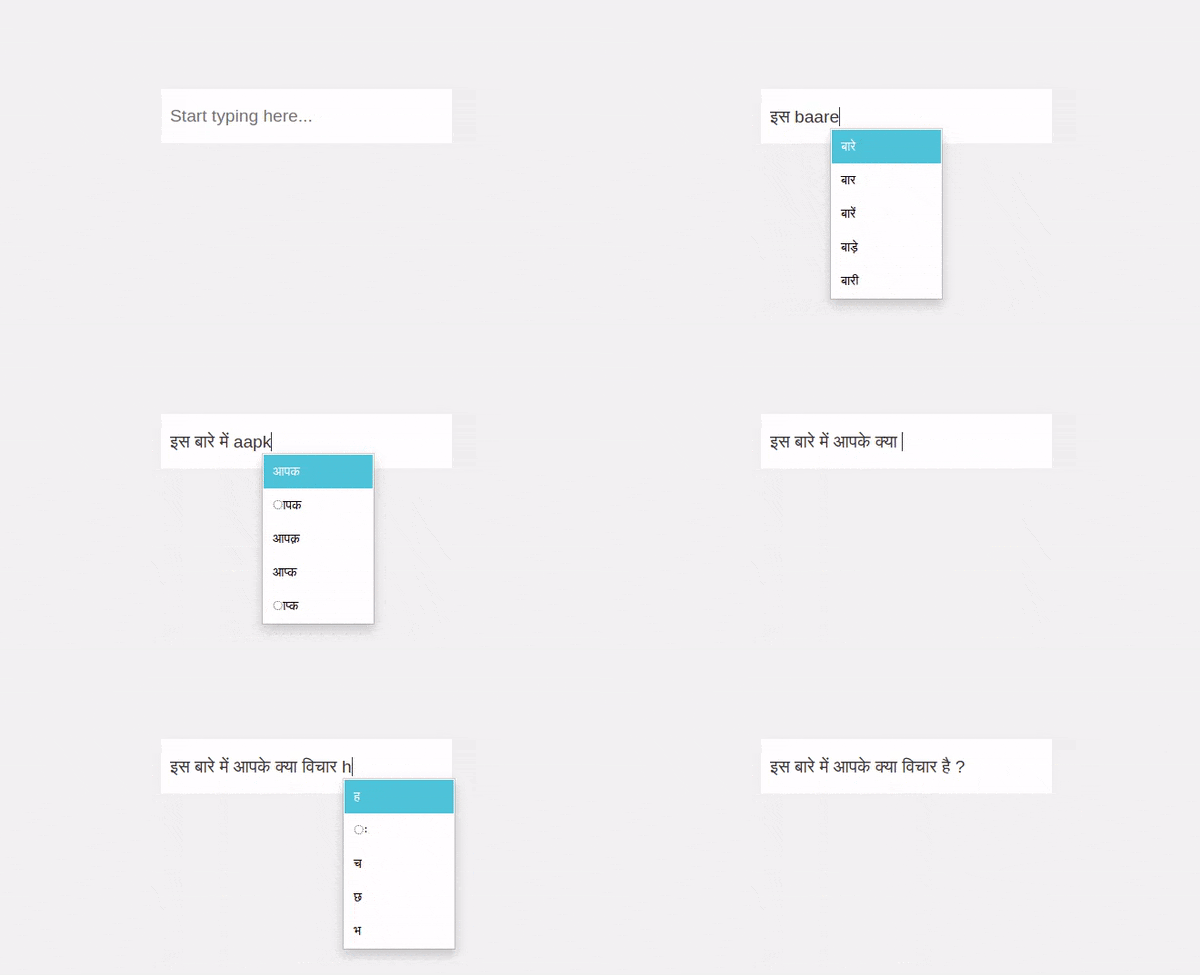 </img>
What this fork changes
Everything below is on top of the original component. Behaviour that differs from upstream is marked, so an upgrade holds no surprises.
| Change | Differs from upstream |
|---|---|
Trigger keys decide what follows the suggestion, through { key, insertText } |
yes, enter and tab no longer behave alike |
Full stop inserts the sentence terminator, । for Hindi and . when the english word is picked |
new key |
Punctuation keys ? ! , ; : commit the suggestion and add the punctuation with a space |
new keys |
| Escape keeps the typed word and hides suggestions until the next word, even when a parent handler blurs the input | yes, escape used to be undone by the blur |
Assamese suggestions take the urdha coma ʼ U+02BC instead of the plain apostrophe google returns |
new behaviour |
validateSuggestions hands the list to an endpoint before it is shown |
new prop |
fetchSuggestions replaces Google Input Tools, with debounceMs, minWordLength and request cancellation |
new props |
| Styles need no import, the component injects them | yes, dist/index.css is optional now |
Highlighted suggestion is #017BFF and the box sizes to its longest suggestion |
yes |
| Node 24, React 19, Vite library build, Vitest, ESLint 9, TypeScript 5.9 | toolchain only |
Demo
Install
npm install --save @sarthak1407/react-transliterate

OR

yarn add @sarthak1407/react-transliterate
Usage
The component injects its own styles, so there is nothing to import. The same
stylesheet is still published as @sarthak1407/react-transliterate/dist/index.css
if you would rather load it through your own pipeline or override it.
Basic example
import React, { useState } from "react";

import { ReactTransliterate } from "@sarthak1407/react-transliterate";

const App = () => {
  const [text, setText] = useState("");

  return (
    <ReactTransliterate
      value={text}
      onChangeText={(text) => {
        setText(text);
      }}
      lang="hi"
    />
  );
};

export default App;
With custom component
import React, { useState } from "react";

import { ReactTransliterate } from "@sarthak1407/react-transliterate";

const App = () => {
  const [text, setText] = useState("");

  return (
    <ReactTransliterate
      renderComponent={(props) => <textarea {...props} />}
      value={text}
      onChangeText={(text) => {
        setText(text);
      }}
      lang="hi"
    />
  );
};

export default App;
Usage with TypeScript
import React, { useState } from "react";

import { ReactTransliterate, Language } from "@sarthak1407/react-transliterate";

const App = () => {
  const [text, setText] = useState("");
  const [lang, setLang] = useState<Language>("hi");

  return (
    <ReactTransliterate
      renderComponent={(props) => <textarea {...props} />}
      value={text}
      onChangeText={(text) => {
        setText(text);
      }}
      lang={lang}
    />
  );
};

export default App;
With material ui
import React, { useState } from "react";

import { ReactTransliterate, Language } from "@sarthak1407/react-transliterate";

import Input from "@material-ui/core/Input";

const App = () => {
  const [text, setText] = useState("");
  const [lang, setLang] = useState<Language>("hi");

  return (
    <ReactTransliterate
      renderComponent={(props) => {
        const inputRef = props.ref;
        delete props["ref"];
        return <Input {...props} inputRef={inputRef} />;
      }}
      value={text}
      onChangeText={(text) => {
        setText(text);
      }}
      lang={lang}
    />
  );
};

export default App;
Custom trigger keys
Keys which when pressed, input the current selection to the textbox.
By default:
| Key | Inserted after the suggestion |
|---|---|
| Space | a space |
| Enter | a space |
| Tab | nothing |
| Full stop | the sentence terminator and a space, eg. । for hi, . for ta |
? ! , ; : |
the punctuation followed by a space |
The full stop key follows the suggestion that is being inserted, not only the
language. Committing नमस्ते in hi gives नमस्ते। , while committing the english
word that was typed gives sarthak.
Pass triggerKeys to change this. An entry is either the key itself
(event.key) or an object with the text to insert after the suggestion:
import React, { useState } from "react";

import {
  ReactTransliterate,
  TriggerKeys,
  PUNCTUATION_TRIGGER_KEYS,
} from "@sarthak1407/react-transliterate";

const App = () => {
  const [text, setText] = useState("");

  return (
    <ReactTransliterate
      value={text}
      onChangeText={(text) => {
        setText(text);
      }}
      lang="hi"
      triggerKeys={[
        // insert the suggestion followed by a space
        { key: TriggerKeys.KEY_SPACE, insertText: " " },
        // insert the suggestion with nothing after it
        { key: TriggerKeys.KEY_ENTER, insertText: " " },
        // insert `।` after the suggestion for hi, `.` for languages
        // that do not use a purnaviram, then a space
        {
          key: TriggerKeys.KEY_FULL_STOP,
          insertText: ({ fullStopCharacter }) => `${fullStopCharacter} `,
        },
        // a plain string is the same as `{ key, insertText: " " }`
        TriggerKeys.KEY_TAB,
        // punctuation, inserted after the suggestion and followed by a space
        ...PUNCTUATION_TRIGGER_KEYS.map((key) => ({
          key,
          insertText: ({ key: pressedKey }) => `${pressedKey} `,
        })),
        // any other key works too
        { key: "-", insertText: "-" },
      ]}
    />
  );
};

export default App;
insertText can be a function, which receives
{ key, suggestion, lang, fullStopCharacter, value, matchStart, matchEnd }
and returns the text to insert.
The sentence terminator used by the full stop key comes from lang. Override
it with the fullStopCharacter prop, or read it yourself with
getFullStopCharacter(lang).
Dismissing suggestions
Pressing Escape closes the suggestion box and keeps the english word that was
typed. Suggestions stay hidden for that word until a new word is started. Set
dismissSuggestionsOnEscape={false} to have the box reopen on the next
keystroke instead.
Styling
The suggestion box ships with its own styles, injected automatically. To
restyle it, pass suggestionsClassName, itemClassName and
activeItemClassName and write your own rules against those classes.
The apostrophe in Assamese
Assamese writes the urdha coma, which is a letter rather than punctuation, so
it is ʼ U+02BC. Google Input Tools answers with the typewriter apostrophe
' U+0027 instead, so suggestions are rewritten before they are shown:
google:    হ'ল   U+09B9 U+0027 U+09B2
inserted:  হʼল   U+09B9 U+02BC U+09B2
Only words already in the target script are touched, so the english word being
typed keeps its plain apostrophe and h'l still reaches the endpoint intact.
Every other language keeps U+0027.
apostropheCharacter overrides the character, and passing "'" keeps whatever
the endpoint returned. getApostropheCharacter(lang) and
APOSTROPHE_CHARACTERS are exported for the same lookup.
Filtering suggestions
Nothing is filtered by the component. A transliteration endpoint answers with
whatever its model produces, and for Hindi that includes words the script does
not allow. Typing every returns five options from Google Input Tools:
["एव्री", "एवेरी", "एवेर्य", "ेवेरय", "एवेरय"]
ेवेरय opens on a dependent vowel sign, so it cannot be typed by hand and
should never be offered. validateSuggestions is where that call is made.
The contract
validateSuggestions?: (
  suggestions: string[],
  context: ValidateSuggestionsContext,
) => Promise<string[]>;
Return the suggestions to keep, in the order they should appear. Throwing, or
rejecting, sends the error to onSuggestionsError and closes the box.
It runs on every list before it is shown, including the typed word when
showCurrentWordAsLastSuggestion puts it there, so a validator can remove that
too. The context carries:
| Field | Use |
|---|---|
lang |
language code the component is set to |
value |
full input value, for validators that need context |
matchStart, matchEnd |
bounds of the word being replaced |
numOptions |
how many suggestions the box will show |
showCurrentWordAsLastSuggestion |
whether the typed word is in the list |
signal |
aborts when the next keystroke supersedes the request |
Pass signal to fetch so a stale check cannot overwrite a newer one.
<ReactTransliterate
  value={text}
  onChangeText={setText}
  lang="hi"
  validateSuggestions={async (suggestions, { lang, signal }) => {
    const response = await fetch(SPELLCHECK_URL, {
      method: "POST",
      headers: { "Content-Type": "application/json" },
      body: JSON.stringify({ words: suggestions, language: lang }),
      signal,
    });

    const data = await response.json();
    return suggestions.filter((word) => !data.invalid.includes(word));
  }}
  onSuggestionsError={(error) => console.error(error)}
  debounceMs={150}
/>
createAnalyzeValidator
For an /analyze endpoint that takes { sentence, language } and reports bad
words in validation.errors, the validator is ready made. The whole list goes
out as one request, since the errors name the offending words:
POST { "sentence": "एव्री एवेरी एवेर्य ेवेरय एवेरय", "language": "hi" }

{
  "validation": {
    "valid": false,
    "errors": [{ "word_index": 3, "word": "ेवेरय", "error_reason": "invalid_sequence" }]
  }
}
Every word named in errors is dropped, leaving
["एव्री", "एवेरी", "एवेर्य", "एवेरय"].
import {
  ReactTransliterate,
  createAnalyzeValidator,
} from "@sarthak1407/react-transliterate";

// built once, outside the component, so its identity stays stable
const validate = createAnalyzeValidator({
  url: import.meta.env.VITE_ANALYZE_URL,
  failOpen: true,
  headers: { Authorization: `Bearer ${token}` },
});

const App = () => {
  const [text, setText] = useState("");

  return (
    <ReactTransliterate
      value={text}
      onChangeText={setText}
      lang="hi"
      validateSuggestions={validate}
      debounceMs={150}
    />
  );
};
| Option | Default | Meaning |
|---|---|---|
url |
endpoint that accepts { sentence, language } |
|
failOpen |
true |
what to do when the request fails, see below |
headers |
{} |
extra headers, for example an authorization header |
failOpen decides the behaviour when the endpoint is unreachable, answers
a non 2xx status, or times out:
trueshows the suggestions unvalidated. The box keeps working during an outage, at the cost of letting a bad word throughfalserethrows.onSuggestionsErrorfires and the box closes, so nothing unvalidated can ever be inserted, at the cost of no suggestions at all while the endpoint is down
An aborted request is never treated as a failure, it just means a newer keystroke took over.
Cost
The validator adds a request per lookup, on top of the one that produced the
suggestions. Set debounceMs so that only pauses in typing cost a round trip,
and minWordLength so single letters do not.
This pairs with the default Google source: Google transliterates, your endpoint
throws out what it cannot parse. Use fetchSuggestions instead when the
endpoint should produce the suggestions as well, and return
{ suggestions, allowCurrentWord: false } from it to keep the typed word out.
Custom suggestion source
fetchSuggestions replaces Google Input Tools with any endpoint. It receives
the word being typed plus the language, the full input value, the bounds of the
word and an AbortSignal that fires when the word changes.
Keep the endpoint out of the source: read it from the environment, so the same build can point at staging or production.
import { useCallback, useState } from "react";
import { ReactTransliterate } from "@sarthak1407/react-transliterate";

// vite exposes VITE_ prefixed variables, next.js uses NEXT_PUBLIC_
const SUGGEST_URL = import.meta.env.VITE_SUGGEST_URL;

const App = () => {
  const [text, setText] = useState("");

  // wrap in useCallback so a new function identity does not restart requests
  const fetchSuggestions = useCallback(async (word, { lang, signal }) => {
    const response = await fetch(SUGGEST_URL, {
      method: "POST",
      headers: { "Content-Type": "application/json" },
      body: JSON.stringify({ word, language: lang }),
      // lets the component drop the request when the word changes
      signal,
    });

    if (!response.ok) {
      throw new Error(`suggestions failed with ${response.status}`);
    }

    const data = await response.json();

    // return the words in the order they should be shown
    return data.suggestions;
  }, []);

  return (
    <ReactTransliterate
      value={text}
      onChangeText={setText}
      lang="hi"
      fetchSuggestions={fetchSuggestions}
      // one request per pause instead of per keystroke
      debounceMs={150}
      minWordLength={2}
      onSuggestionsError={(error) => console.error(error)}
    />
  );
};
A source can also answer with an object instead of an array, to keep the typed word out of the box when the endpoint says the word is not usable:
return { suggestions: ["बड़ा", "बड़े"], allowCurrentWord: false };
Ready made source for an /analyze endpoint
createAnalyzeSource adapts an endpoint that takes { sentence, language }
and answers with per word spell_suggestions and codemix_options:
import {
  ReactTransliterate,
  createAnalyzeSource,
} from "@sarthak1407/react-transliterate";

// created once, outside the component, so the identity stays stable
const analyze = createAnalyzeSource({
  // your endpoint, from the environment rather than hardcoded
  url: import.meta.env.VITE_ANALYZE_URL,
  // "spell" for corrections, "codemix" for the latin spellings, or "both"
  use: "both",
  // drop spelling suggestions the endpoint is unsure about
  minConfidence: 0.6,
  // send the whole input for context instead of the word alone
  sendFullSentence: false,
  // leave the typed word out when `validation.errors` reports it
  dropInvalidWord: true,
  headers: { Authorization: `Bearer ${token}` },
});

const App = () => {
  const [text, setText] = useState("");

  return (
    <ReactTransliterate
      value={text}
      onChangeText={setText}
      lang="hi"
      fetchSuggestions={analyze}
      onSuggestionsError={(error) => console.error(error)}
    />
  );
};
The response it expects:
{
  "words": [
    {
      "original": "बड",
      "spell_suggestions": [{ "word": "बड़ा", "confidence": 0.75 }],
      "codemix_options": ["budd", "bud"],
      "start": 0,
      "end": 6
    }
  ],
  "validation": { "valid": true, "errors": [] }
}
Spelling suggestions come first, ordered by confidence, then the codemix
options. The typed word is removed from the list because the component appends
it itself when showCurrentWordAsLastSuggestion is on, and it is left out
entirely when validation.errors names it.
Get transliteration suggestions
import { getTransliterateSuggestions } from "@sarthak1407/react-transliterate";

const data = await getTransliterateSuggestions(
  word, // word to fetch suggestions for
  {
    numOptions: 5, // number of suggestions to fetch
    showCurrentWordAsLastSuggestion: true, // add the word as the last suggestion
    lang: "hi", // target language
  },
);
For a full example, take a look at the example folder
Props
| Prop | Required? | Default | Description |
|---|---|---|---|
| onChangeText | Yes | Listener for the current value from the component. (text: string) => void |
|
| value | Yes | value prop to pass to the component |
|
| enabled | true | Control whether suggestions should be shown | |
| renderComponent | (props) => <input {...props} /> |
Component to render. You can pass components from your component library as this prop | |
| lang | hi | Language you want to transliterate. See the following section for language codes | |
| maxOptions | 5 | Maximum number of suggestions to show in helper | |
| offsetY | 0 | Extra space between the top of the helper and bottom of the caret | |
| offsetX | 0 | Extra space between the caret and left of the helper | |
| containerClassName | empty string | Classname passed to the container of the component | |
| containerStyles | {} | CSS styles object passed to the container | |
| activeItemStyles | {} | CSS styles object passed to the active item <li> tag |
|
| hideSuggestionBoxOnMobileDevices | false |
Should the suggestions be visible on mobile devices since keyboards like Gboard and Swiftkey support typing in multiple languages | |
| hideSuggestionBoxBreakpoint | 450 | type: number. To be used when hideSuggestionBoxOnMobileDevices is true. Suggestion box will not be shown below this device width |
|
| triggerKeys | KEY_SPACE, KEY_ENTER, KEY_TAB, KEY_FULL_STOP and PUNCTUATION_TRIGGER_KEYS |
Keys which when pressed, input the current selection to the textbox. Each entry is a key or { key, insertText } |
|
| fullStopCharacter | terminator of lang, eg. । for hi |
Character inserted by the full stop trigger key. Ignored when the selected suggestion is the english word, which always takes . |
|
| dismissSuggestionsOnEscape | true |
Escape keeps the typed english word and hides suggestions until the next word |
|
| insertCurrentSelectionOnBlur | true |
Should the current selection be inserted when blur event occurs |
|
| showCurrentWordAsLastSuggestion | true |
Show current input as the last option in the suggestion box | |
| suggestionsClassName | empty string | Classname passed to the suggestion box <ul> |
|
| itemClassName | empty string | Classname passed to every suggestion <li> |
|
| activeItemClassName | empty string | Classname passed to the highlighted suggestion <li>, on top of itemClassName |
|
| fetchSuggestions | Google Input Tools | Where suggestions come from. (word, context) => Promise<string[] \| SuggestionsResult> |
|
| validateSuggestions | Checks the suggestions before they are shown. (suggestions, context) => Promise<string[]> |
||
| apostropheCharacter | ʼ for as, ' elsewhere |
Apostrophe written into a suggestion once it is in the target script | |
| debounceMs | 0 | Wait this long after the last keystroke before asking for suggestions | |
| minWordLength | 1 | Do not ask for suggestions until the word is at least this long | |
| onSuggestionsError | Called when a source or validator rejects. Aborted requests are not reported |
Supported Languages
| Language | Code |
|---|---|
| Amharic | am |
| Arabic | ar |
| Bangla | bn |
| Belarusian | be |
| Bulgarian | bg |
| Chinese (Hong Kong) | yue-hant |
| Chinese (Simplified) | zh |
| Chinese (Traditional) | zh-hant |
| French | fr |
| German | de |
| Greek | el |
| Gujarati | gu |
| Hebrew | he |
| Hindi | hi |
| Italian | it |
| Japanese | ja |
| Kannada | kn |
| Malayalam | ml |
| Marathi | mr |
| Nepali | ne |
| Odia | or |
| Persian | fa |
| Portuguese (Brazil) | pt |
| Punjabi | pa |
| Russian | ru |
| Sanskrit | sa |
| Serbian | sr |
| Sinhala | si |
| Spanish | es |
| Tamil | ta |
| Telugu | te |
| Tigrinya | ti |
| Ukrainian | uk |
| Urdu | ur |
| Vietnamese | vi |
Development
Requires node 20 or newer, node 24 is what the repo is pinned to in .nvmrc
nvm use            # node 24
yarn install       # builds the library through the prepare script

yarn test          # unit tests, lint and a production build
yarn test:unit     # vitest
yarn test:watch    # vitest in watch mode

yarn start         # rebuild the library on change
cd example && yarn install && yarn dev   # example app on localhost:3000
The library is built with Vite in library mode, types come from tsc, tests run
on Vitest with jsdom, and the example app is a Vite React app.
Credits
The original react-transliterate was written by
Burhanuddin Udaipurwala and published at
burhanuday/react-transliterate.
The component, the suggestion box, the caret tracking and the language support
that this package rests on are his work, released under the MIT license.
Upstream is tracked as the upstream remote, so fixes there can be pulled in.
Transliteration suggestions come from Google Input Tools.
This fork
Maintained by Sarthak Sahoo. Added on top of the original:
- Trigger keys with per key insertion.
triggerKeysaccepts{ key, insertText }, so space, enter, tab and punctuation each decide what follows the suggestion. The full stop key inserts the sentence terminator of the language,।for Hindi and.when the english word is the selection - Punctuation keys.
?!,;:commit the highlighted suggestion and add the punctuation with a space - Escape that sticks. Escape keeps the typed english word and hides suggestions until the next word starts, and can no longer be undone by a parent handler that blurs the input in the same event dispatch
- Suggestion validation.
validateSuggestionshands the list to an endpoint before it is shown, so words the endpoint rejects, such asेवेरयfor “every”, never reach the box.createAnalyzeValidatorimplements it for an/analyzeendpoint - Pluggable suggestion sources.
fetchSuggestionsreplaces the Google endpoint with any api, withdebounceMs,minWordLength,onSuggestionsErrorand request cancellation.createAnalyzeSourceadapts an/analyzeendpoint that returns spelling corrections and codemix options - Styles that need no import. The stylesheet is injected by the component, with class hooks for the suggestion box and its items
- Modern toolchain. Node 24, React 19, Vite library build, Vitest, ESLint 9 flat config, TypeScript 5.9
See what this fork changes for the same list with links, and which entries change behaviour you may be relying on.
License
MIT.
Copyright (c) 2021 Burhanuddin Udaipurwala for the original work, copyright (c) 2026 Sarthak Sahoo for this fork.